Finding the right portion size should be quick and straightforward. Based on feedback from nutrition professionals using NutriAdmin, we’ve updated how portion sizes work in the food database.
The goal is straightforward: make it easier to find the portion you need while keeping your custom portions available when you need them.
Here’s what changed and what it means for your nutrition practice.
What Was Wrong With the Old Portion System?
Previously, when a user created a custom portion for a food, that portion was added to the shared food database and became visible to other users.
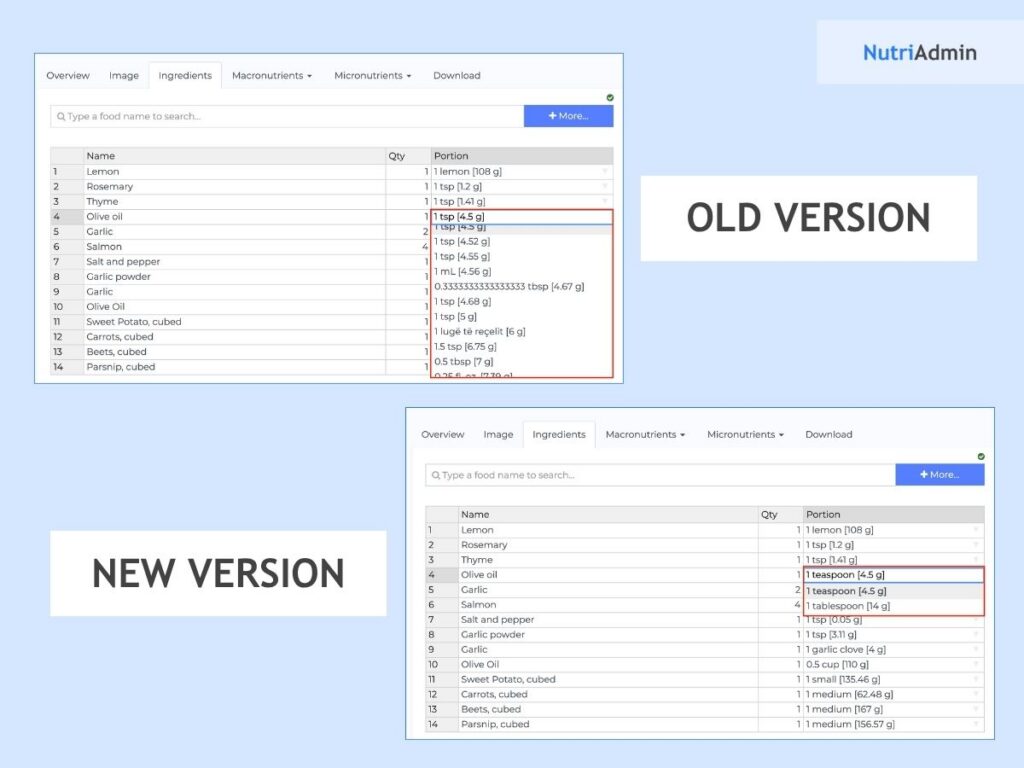
Over nearly ten years, this resulted in thousands of custom entries being added to commonly used foods. Some foods ended up with hundreds of portion options, making it difficult to find the standard portions you actually wanted.
For example, a food might have entries such as:
- 1 oz (17 g), where the weight did not make sense
- 1 MI (0.6 g), with an unclear or incorrect unit
- Duplicate portions listed multiple times
- Portions displayed in different languages
- Custom entries that were only relevant to the person who created them
What’s Changed With Food Database Portions?
We’ve made three key changes to make portion selection cleaner.
The Portion List Is Less Cluttered
When selecting a portion for a food, you’ll now see the standard reference portions without the old database clutter. These reference portions come from sources including:
- USDA
- AUSNUT
- CoFID
Duplicated, foreign-language, and incorrect custom entries no longer appear in the standard portion selection list.
On some of the most affected foods, a list that previously contained several hundred entries may now contain only a handful of relevant options. This makes it much easier to quickly find the portion you need when creating a meal plan or recipe.
Custom Portions Are Now Saved to Your Account
If you create a custom portion, it is now saved to your own account instead of the shared food database. This means you can still create the portions that fit your workflow without adding unnecessary entries for everyone else.
For example, if you regularly use a specific serving size for a particular ingredient, you can create your custom portion and continue using it without adding it to the global food database.
For teams on a business plan, custom portions can also be available to your teammates.
Recipe Imports No Longer Add Portions Automatically
Recipe imports previously created unit conversions that were added to the shared food record.
That no longer happens.
When you import a recipe, it won’t quietly add new custom portions to the shared food database. This helps keep food records cleaner over time and prevents unnecessary portion conversions from accumulating.
What Hasn’t Changed?
The update only affects which portions you’re offered when choosing a new portion. It does not change the portions you’ve already used.
Nothing has been deleted from your existing meal plans, recipes, or templates.
For example, if a saved meal plan uses an older custom portion, that portion:
- Remains selected on the meal plan
- Keeps the same label
- Keeps the same number or weight
- Continues to work as before
So if you already have recipes or meal plans built using specific portions, you don’t need to go back and update them.
Why Did We Make This Change?
The food database has been used and expanded for nearly a decade. While allowing everyone to contribute custom portions seemed useful at the time, it eventually created the opposite problem: too many options made it harder to find the right one.
This update separates standard food database portions from personal custom portions.
The result is a cleaner food database for everyone, while still giving practitioners the flexibility to create and use custom portions for their own workflows.
What If You Preferred the Old Portion List?
If you rely on a portion that no longer appears in the standard list, or you simply preferred having access to the full list, that’s still an option.
Send us a message at team@nutriadmin.com, and we can restore the full portion list for your account. This only affects your account and does not change the experience for other users.