Choosing nutrition software for your practice can take time, especially when comparing platforms with different features and pricing structures. If you’re considering NutriAdmin as an alternative to Healthie, this comparison will help you understand what each platform offers.
Run your nutrition practice from one place
NutriAdmin combines client management, meal planning, questionnaires, and billing built for nutrition professionals, coaches, and personal trainers — start your free trial.
Start Free TrialIn this article, we’ll compare NutriAdmin vs Healthie across features, pricing, free trials, and user reviews. We’ll look at their differences in practice management, client management, meal planning, and other tools to help you decide which platform better fits your needs.
Last updated: November 2026
- Why trust the author's comparison?
- Third-party Data Comparison: Healthie vs NutriAdmin
- Overall Comparison: Healthie and NutriAdmin
- Features Breakdown: Healthie vs NutriAdmin
- Pricing Comparison and Free Trial, Healthie vs NutriAdmin
- Reviews Comparison, NutriAdmin vs Healthie
- Company comparison, Healthie and NutriAdmin
- Summary
- Frequently Asked Questions
Why trust the author’s comparison?
I’m Lucy, a Nutritionist and customer support representative at NutriAdmin. Through my work, I’ve interacted with dietitians, nutritionists, and other wellness professionals, helping them understand and use software for their practices. These interactions have given me a better understanding of the challenges professionals face when managing their clients and day-to-day workflows.
I work at NutriAdmin, so I naturally have more familiarity with our platform. However, I want this comparison to be useful to readers regardless of which software they eventually choose. I’ll use publicly available information, official product documentation, and reliable third-party sources when comparing NutriAdmin and Healthie.
If anyone from Healthie is reading this and notices outdated or incorrect information, please feel free to reach out. I’ll be happy to review any corrections and update the article where necessary.
Goal of this Healthie vs NutriAdmin comparison
Choosing software for your practice is an important decision. You’ll likely invest time setting up your account, organizing client records, creating workflows, and getting familiar with the platform. The software you choose can also influence how you manage appointments, communicate with clients, process payments, and deliver nutrition services.

This comparison aims to give you a clearer picture of what NutriAdmin and Healthie offer, including their features, pricing, and user feedback. We’ll highlight their differences and discuss the types of practices each platform may suit.
One thing worth clarifying: this article isn’t intended to convince you to choose NutriAdmin over Healthie. We recognize that different practitioners have different requirements. Our goal is to provide useful, factual information so you can evaluate both platforms and decide which one works best for your practice.
Third-party Data Comparison: Healthie vs NutriAdmin
For this Healthie vs NutriAdmin comparison, I’ll use information from Capterra, a software review platform where users share feedback about products they’ve used.
According to Capterra’s review verification process, submitted reviews undergo manual checks and other verification measures intended to confirm reviewer authenticity and identify potentially fraudulent content. Capterra also has guidelines for handling reviews that violate its policies. However, user reviews reflect individual experiences and opinions, so they should be considered alongside other sources.
I’ll also refer to the official websites and documentation of NutriAdmin and Healthie to compare features, pricing, and plan limitations.
You’re welcome to check other software review platforms and the companies’ websites to explore additional feedback and verify product information. Comparing several sources can give you a more complete picture of what each platform offers and whether it suits your practice.
Overall Comparison: Healthie and NutriAdmin
On Capterra, NutriAdmin and Healthie are both listed under the Nutritionist Software category. However, sharing the same category doesn’t mean they offer the same tools or serve exactly the same needs.

NutriAdmin focuses on nutrition-specific tools, such as meal planning, recipe management, and nutritional analysis, alongside practice management features. Healthie, on the other hand, offers a broader range of practice management tools, including electronic health records (EHR), clinical documentation, telehealth, and client management. It also integrates with Living Plate Rx, a separate platform that provides meal planning tools.
Both platforms have some overlapping features, but which one is right for you will depend on how you run your practice and the tools you need.
Now, let’s move on to the specifics of the features, reviews, and pricing of NutriAdmin and Healthie to help you identify the best nutrition software alternative for your business.
Features Breakdown: Healthie vs NutriAdmin
Working at NutriAdmin, I’m aware of my potential bias due to greater familiarity with NutriAdmin’s features than Healthie’s.
In an effort to minimize this bias and present a balanced comparison, I will use data from the official websites of both Healthie and its alternative, NutriAdmin, to guarantee complete and current information on their respective features. However, since both apps present their features differently on their websites, this article will also present them accordingly.
Healthie Features
Healthie categorized their features into three main parts: practice management, cloud-based EHR, and patient engagement. Aside from the main features, we will also discuss a separate subscription plan, Healthie+.
Practice Management
- Scheduling – Book sessions and automate follow-ups.
- Reporting & Analytics – View patient population data, business forecasting, and usage statistics.
- Insurance – Create and submit insurance claims, track statuses, and collect patient payments.
- Billing – Ensures support for all billing methods and compliance with standards.
- Workflow Automation – automatic reminders, intake documents, confirmations and portal invite. Task management feature and pre-fill fields across charting and billing.
Cloud-based EHR
- Intake & Onboarding – Use custom forms that seamlessly integrate into patient charts and billing.
- Charting – Access patient information securely on any device.
- Care Plans – Apply standard protocols and provide recommendations, resources, and documents progressively.
- Clinical Tools – Fullscript, E-Labs, E-Rx, referral management and more.
- Multi-Provider Support – Share resources, collaborate across patients, and set custom permissions as needed for your business.
Patient Engagement
- Patient Portal – Users can add journal entries, view and share documents, and chat within a secure patient portal.
- Telehealth & Webinars – Conduct virtual sessions safely on any device.
- Messaging – HIPAA-compliant messaging platform.
- Journaling – Increase accountability and long-term success.
- Programs & Courses – Easily enroll current or potential patients into a preset program.
Healthie offers a range of practice management features and integrates with other tools commonly used by healthcare professionals. You can browse the available integrations on their website.
For meal planning, Healthie integrates with Living Plate Rx. Activating the integration is free, but you’ll need an eligible Healthie subscription and a separate, active Living Plate Rx membership.
For larger practices and healthcare organizations, Healthie also offers Healthie+, an enterprise platform with API access, customizable integrations, and options for tailoring the platform to your organization’s needs. It also provides tools for reporting, workflow management, and coordinating care across teams.
NutriAdmin Features
NutriAdmin, as an alternative to Healthie, is an all-in-one software that includes practice management features as well as comprehensive meal planning and recipe management features.
Practice Management Features
- Customer Relationship Management (CRM) – Manage electronic health records and client profiles with customizable fields, securely stored in a HIPAA-compliant cloud.
- Online Customizable Questionnaires – Easily send branded questionnaires with pre-made forms or custom ones with a single click.
- One-Click Online Payments – Simplify client billing with Stripe integration.
- Calendar, Appointments, and Reminders – Manage your schedule efficiently, send available meeting dates to clients, and improve client compliance with automated reminders.
- Automated Reports and Templates – Quickly generate reports using client data from questionnaires and consultation notes.
- Client Portal Web App – Provide clients with secure access to their data, including questionnaires, reports, and meal plans, with the option for HIPAA-compliant video calls through a telehealth add-on. While NutriAdmin doesn’t have a mobile app yet, the web app can still be accessed through a phone’s web browser. However, NutriAdmin is open to the possibility of developing a client app in the future.
Recipe Management and Meal Planning Features
- Advanced Recipe Management – Add or search for recipes, seamlessly add them into meal plans, and automatically analyze calories, macros, and micronutrients.
- AI Recipe Generator – Generate recipes from one-line descriptions with realistic images and automatic nutritional analysis, powered by OpenAI.
- Recipes Database – Access dietitian-vetted recipes with customizable search filters for easy integration into meal plans.
- Nutrition Analysis – Accurately analyze macronutrients and micronutrients from recipes, meal plans and food logs.
- Meal Planning Software – Access a database of over 100,000 food items across four databases, with automatic generation of nutritional analyses and shopping lists.
- Meal Plan Generator – Quickly create professional meal plans in just 60 seconds.
The NutriAdmin software also has a Business plan that can help businesses with multiple practitioners to collaborate with each other in terms of client data, schedules, meal plans, reports, and more.
Pricing Comparison and Free Trial, Healthie vs NutriAdmin
Both NutriAdmin and Healthie offer a 14-day free trial, allowing you to explore their features before committing to a subscription.
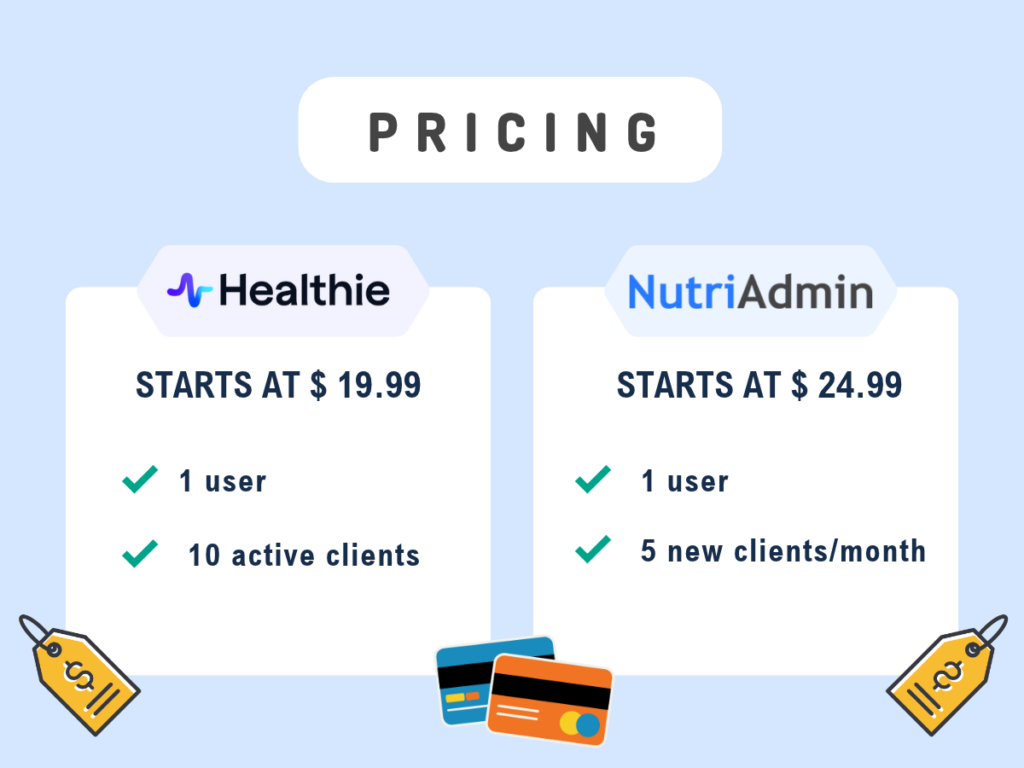
Healthie’s cheapest paid plan is Core at $19.99/month, which supports up to 10 active clients. Its Essentials plan costs $49.99/month for up to 250 active clients.
NutriAdmin’s Basic 5 plan costs $24.99/month and allows up to five new clients per month. Its main Basic plan costs $34.99/month and allows up to 10 new clients per month.
To be more transparent, if you want the meal plan generator feature included in your NutriAdmin subscription, you have to choose the Popular Plan for $49.99. However, lower plans still include basic meal planning and most practice management features. You can check NutriAdmin’s pricing page for more details.
If you need NutriAdmin’s automated meal plan generator, you’ll need the Popular plan at $49.99/month. Lower plans still include basic meal planning and core practice management features.
Healthie offers meal planning through its Living Plate Rx integration. Activation is free, but you’ll need an active Healthie Plus plan or higher, starting at $129.99/month, as well as a separate, active Living Plate Rx membership.
Reviews Comparison, NutriAdmin vs Healthie
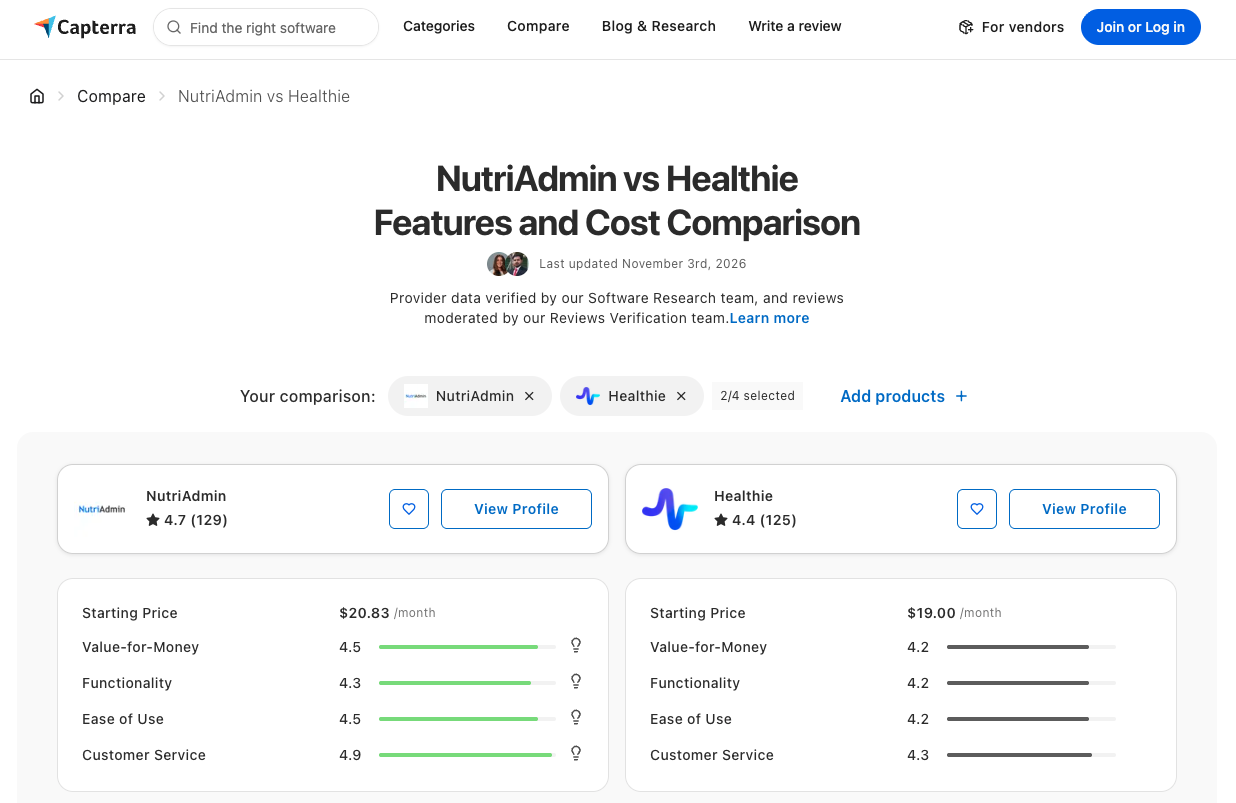
In the comparison from Capterra user reviews, both nutrition apps reveal that Healthie holds a rating of 4.4 from 125 users. In contrast, its alternative, NutriAdmin, has a higher rating of 4.7 stars from 129 users.
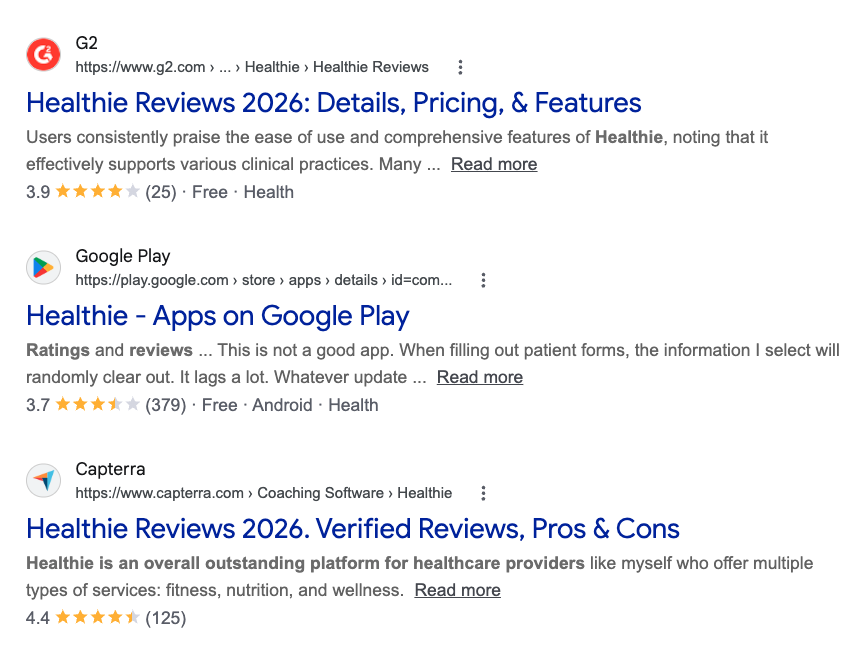
To see user reviews from other third-party websites, I’ve included screenshots of the top Google results for Healthie reviews and NutriAdmin reviews. However, please note that Google’s top results may vary depending on your location. Feel free to do further research and read specific reviews to understand both apps’ user experiences.
Company comparison, Healthie and NutriAdmin
NutriAdmin and Healthie were both founded in 2016, but they have different company structures and approaches to serving nutrition and healthcare professionals.
NutriAdmin is a self-funded company with a small team. You can learn more about its background and approach on its About page.
Healthie is a larger, investor-backed company offering practice management and healthcare technology solutions. In addition to serving individual practitioners, it provides enterprise solutions for larger healthcare organizations. You can learn more on Healthie’s About page.
Summary
In this Healthie vs NutriAdmin comparison, we’ve looked at the features, pricing, user reviews, free trials, and company backgrounds of both platforms.
Although both serve nutrition professionals, including dietitians and health coaches, they have different strengths.
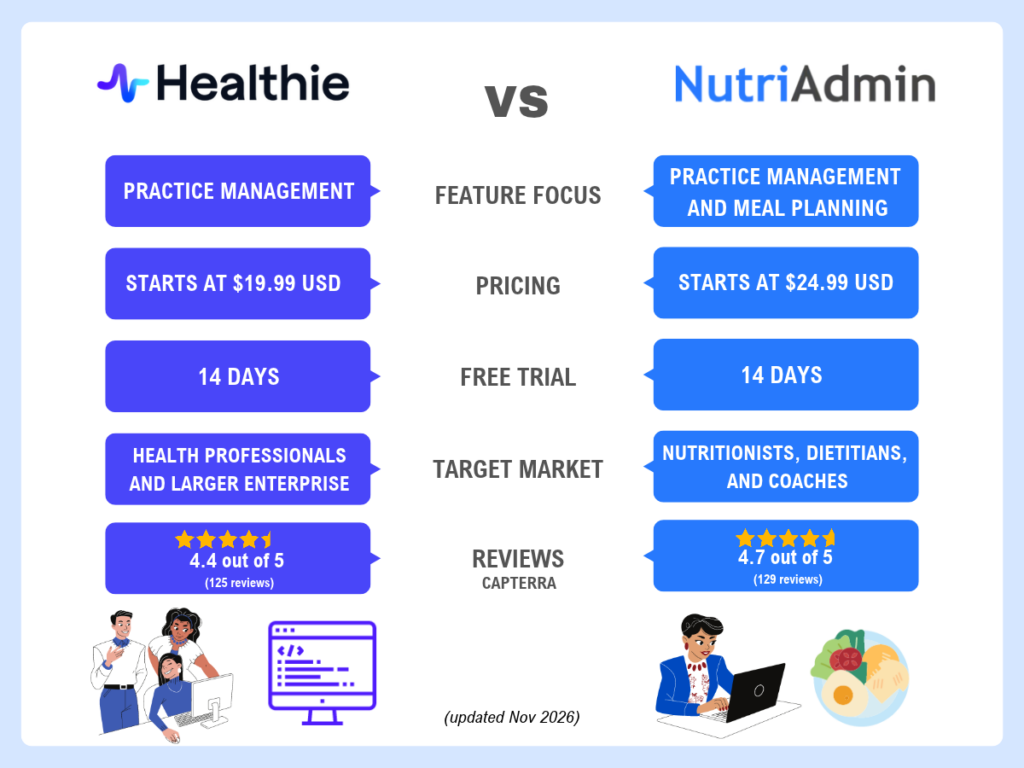
NutriAdmin may be a good fit for small to medium-sized nutrition practices looking for an all-in-one platform with nutrition-specific tools. It combines practice management features with meal planning, recipe management, and nutritional analysis at a competitive price point.
Healthie may be a better fit for practices and healthcare organizations that need broader practice management capabilities and options for scaling their operations. Its Healthie+ offering includes features such as API access, customizable integrations, and tools designed to support larger organizations.
Ultimately, the right choice depends on your practice size, workflow, budget, and the features you need. Take advantage of the 14-day free trials to explore both platforms and see how they fit into your day-to-day work.
If you’d like to explore more options, visit our NutriAdmin alternatives and comparisons page. It includes comparisons of features, pricing, reviews, and free trials to help you evaluate other nutrition software solutions.