Choosing the right coaching software can make a significant difference in how you manage your nutrition or fitness business. Between scheduling client appointments, creating personalized plans, tracking progress, and handling administrative tasks, managing a coaching practice involves much more than working directly with clients.
Run your nutrition practice from one place
NutriAdmin combines client management, meal planning, questionnaires, and billing built for nutrition professionals, coaches, and personal trainers — start your free trial.
Start Free TrialIf you’re comparing ABC Trainerize vs NutriAdmin, you’re likely looking for software that can simplify your daily workflow while giving you the tools you need to support your clients.
Both platforms offer features for coaches and fitness professionals, but they serve somewhat different needs. In this comparison, we’ll look at their features, pricing, free trials, and customer reviews to help you understand what each platform offers and which one may be a better fit for your business.
The right software for coaches can help reduce administrative work and make managing your practice more efficient. If you’re still exploring your options, you can also check out our guide to the best apps for personal trainers for more software recommendations and practical resources.
However, if you’ve narrowed your choices down to NutriAdmin and ABC Trainerize, keep reading for a closer look at how the two platforms compare.
Updated: November 2026
Credibility
My name is Lucy, and I work as a nutritionist and customer support assistant for NutriAdmin. Through my work, I regularly interact with nutritionists, dietitians, fitness professionals, and coaches who use the platform or are exploring their software options. This gives me first-hand insight into the common challenges professionals face when managing their clients and running their businesses.
Although I work for NutriAdmin, I’ve used publicly available information from both companies and independent sources to prepare this comparison. I’ve also included links to ABC Trainerize’s official website so readers can check the information for themselves.
We welcome feedback from ABC Trainerize and its users. If you spot outdated or inaccurate information, please let us know so we can review and update it.
ABC Trainerize vs NutriAdmin: Overall Comparison
Trainerize and NutriAdmin are both coaching platforms, but their main areas of focus differ.
ABC Trainerize is primarily designed for personal trainers and fitness coaches. It offers tools for workout programming, exercise tracking, client communication, habit tracking, and nutrition coaching. It also supports branded mobile apps and integrations with fitness devices and wearables.
NutriAdmin is designed primarily for nutritionists, dietitians, personal trainers, and coaches who need tools to manage their clients and nutrition services. Its features include client management, meal planning, recipe management, nutritional analysis, questionnaires, and practice management tools.
Both platforms offer nutrition-related features, so the distinction isn’t that one supports nutrition and the other doesn’t. Rather, ABC Trainerize places greater emphasis on fitness and workout coaching, while NutriAdmin focuses more heavily on nutrition management and practice administration.
Your choice will depend on the services you offer and the tools you need most. For example, a personal trainer who prioritizes workout programming and exercise tracking may prefer ABC Trainerize. A dietitian who regularly creates personalized meal plans, analyzes recipes, and manages nutrition clients may find NutriAdmin better suited to their workflow.
Some professionals may even find value in using both platforms if they offer extensive fitness and nutrition services.
Reviews Comparison, NutriAdmin vs ABC Trainerize
Customer reviews can help you understand how other professionals experience a software platform, including its ease of use, customer support, features, and overall value.
One useful starting point is Capterra, a software review platform where users can rate products and share feedback about their experiences.
Capterra Reviews: NutriAdmin vs ABC Trainerize
According to Capterra, both NutriAdmin and ABC Trainerize have positive overall ratings.
Here are their latest ratings available at the time of writing:
| Review Platform | ABC Trainerize | NutriAdmin |
|---|---|---|
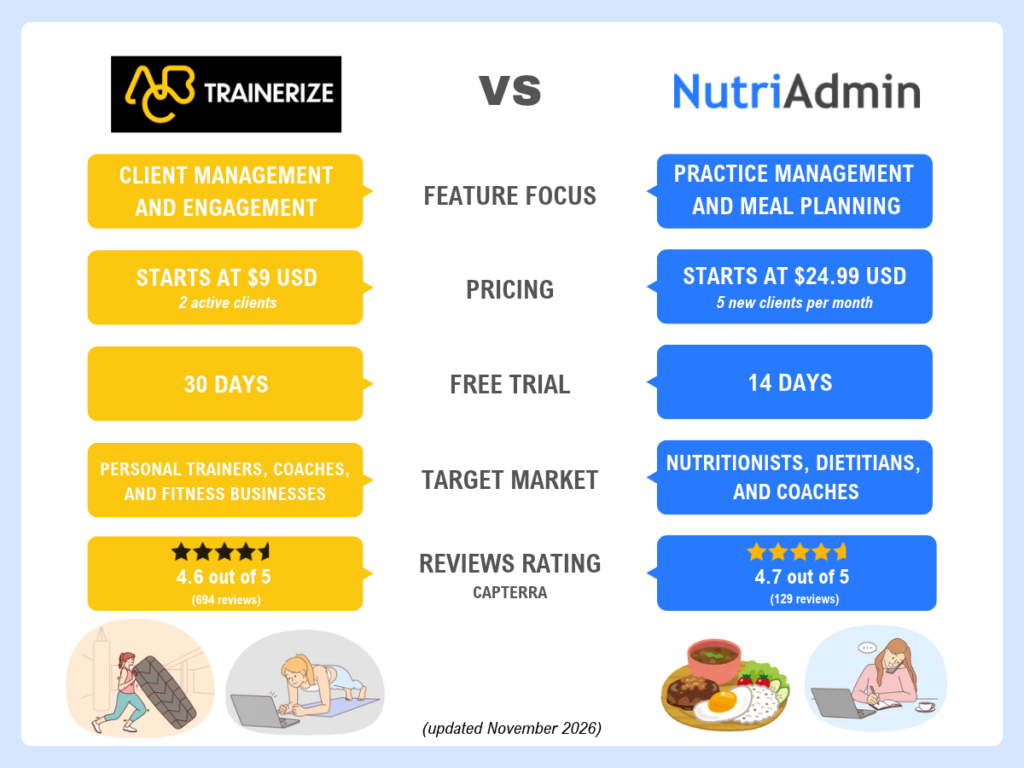
| Capterra Rating | 4.6/5 | 4.7/5 |
| Number of Reviews | 694 | 129 |
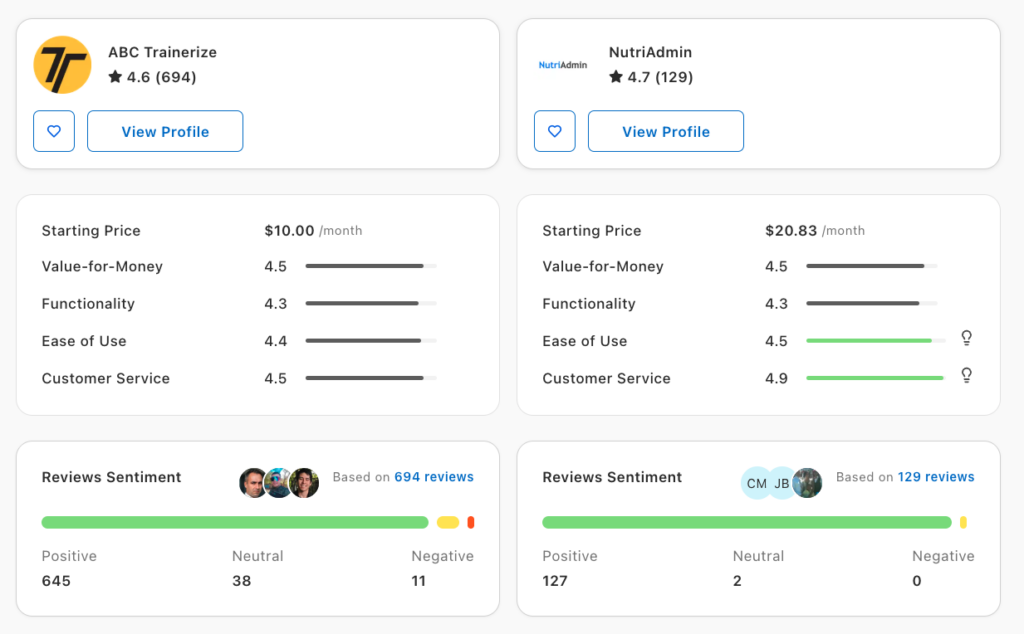
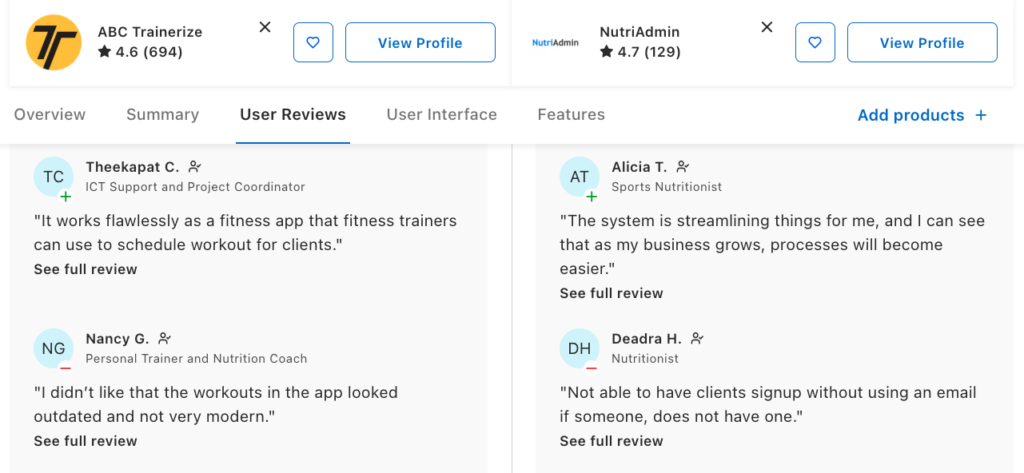
NutriAdmin has a slightly higher average rating on Capterra, while ABC Trainerize has a considerably larger number of reviews. Both figures are worth considering, but ratings alone do not tell you whether a platform is suitable for your business.
You can read the ratings and reviews comparison directly on Capterra:
ABC Trainerize vs NutriAdmin reviews
ABC Trainerize Reviews on Other Platforms
You can also find ABC Trainerize reviews on other software review websites. These provide additional feedback from users, although ratings may differ depending on the platform and its reviewer base.
Here are the ratings currently listed:
| Review Platform | ABC Trainerize rating | Number of reviews |
|---|---|---|
| G2 | 4.7/5 | 171 |
| Trustpilot | 3.1/5 | 103 |
You can explore the reviews yourself:
When evaluating either platform, read a selection of positive and negative reviews rather than relying exclusively on the overall rating. Pay particular attention to comments about the features you plan to use, customer support, reliability, and pricing.
This will give you a better understanding of what existing users appreciate and where they experience difficulties.
Features Breakdown: ABC Trainerize vs NutriAdmin
ABC Trainerize and NutriAdmin offer tools for managing clients and delivering nutrition or fitness coaching. However, their main areas of focus differ.
Here’s an overview of the key features available on each platform, including capabilities that may require additional subscriptions or paid add-ons.
ABC Trainerize Features
ABC Trainerize organizes its features into five main areas: Coach, Engage, Manage, Add-ons, and Integrations. Its platform combines workout programming, nutrition coaching, client engagement, and business management tools.
Coaching and Client Engagement
- Workout Programming: Create personalized training plans using workout templates, an exercise library, and an AI Workout Builder.
- Nutrition Coaching: Help clients track meals, monitor macros, and follow personalized meal plans using Trainerize’s nutrition tools.
- Habit Tracking: Set client habits, monitor progress, and encourage consistency through goals, streaks, and badges.
- Client Communication: Send messages, automated notifications, and voice messages. You can also conduct video calls with clients.
- Community and Challenges: Create client groups, organize fitness challenges, and share daily workouts.
Client Management and Business Operations
- Client Management: Organize client profiles, monitor progress, and track workout and nutrition compliance.
- Scheduling: Manage appointments, consultations, group sessions, and classes.
- Payments: Accept one-time and recurring payments through Stripe and sell coaching packages and digital products.
- Team Management: Manage trainers, assign roles, and organize clients across business locations.
Business Growth and Integrations
- Marketing: Create a public coaching profile through Trainerize.me and use referral tools to attract new clients.
- Custom Branded App: Offer clients a mobile app featuring your business branding.
- Add-ons: Access additional tools for business management, advanced nutrition coaching, video coaching, and client support.
- Integrations: Connect with third-party platforms and devices such as Apple Watch, Garmin, Fitbit, MyFitnessPal, Zapier, and Mindbody.
Visit the official ABC Trainerize features page for more information.
NutriAdmin Features
NutriAdmin is an all-in-one nutrition practice management and meal planning software designed for nutritionists, dietitians, personal trainers, and coaches.
Its features cover client management, nutrition assessments, meal planning, recipe management, and nutritional analysis.
- Customer relationship management (CRM): Manage your clients’ data securely with Electronic Medical Records. You can customize profiles and access nutritionist-specific fields.
- Online Customizable Questionnaires: Allow your clients to fill in data from pre-made or customized questionnaires using your branding.
- Online Payments: Accept online payments through Stripe from your NutriAdmin account. You can create multiple services with different amounts, including subscriptions with recurring billing.
- Calendar, appointments, and reminders: Automated reminders can help enhance client compliance. Schedule appointments effortlessly and send availability with a click. You will receive automatic email notifications. Your clients may also receive SMS reminder texts.
- Automated reports and templates: Auto-populates client data in reports and saves templates for quick use. You can reduce formatting and repetitive tasks, saving you valuable time.
- Client Portal Web App: Secure place to share questionnaires, meal plans, and reports with clients. Use HIPAA-compliant telehealth add-on for video calls with clients.
- Advanced Recipe Management: With advanced recipe management tools, you can access an extensive recipe database or create your own, generate nutritional analysis, and create an automatic shopping list.
- AI Recipe Generator: Generate new recipes with NutriAdmin’s AI Recipe Generator add-on featuring realistic images.
- Meal Planning Software: Create customized meal plans with NutriAdmin’s meal plan generator in 60 seconds. You can also create meal plans from scratch using your own recipes or a combination of NutriAdmin’s recipes database and your own.
- Nutritional Analysis: Every food, recipe, and meal plan includes accurate energy, macronutrient, and micronutrient data from USDA, AUSNUT, and UK food databases. You can also make a nutritional analysis for your client’s food diary.
Visit the NutriAdmin features page to explore the platform, watch product demonstrations, and try interactive demos.
Security Comparison
ABC Trainerize’s website states that they are not HIPAA compliant. This is because the majority of their user base is not HIPAA-covered entities. Nevertheless, they perform regular security audits to identify vulnerabilities and have a strict data security process in place.
Many NutriAdmin users are nutritionists and dietitians who have access to Protected Health Information (PHI), which means the software they use also needs to comply with HIPAA regulations.
You can read documents from our security page for more information on NutriAdmin’s data security and privacy policies, including HIPAA compliance policies.
Pricing Comparison, ABC Trainerize vs NutriAdmin
ABC Trainerize and NutriAdmin use different pricing models. ABC Trainerize bases its pricing on the number of active coaching clients, while NutriAdmin limits the number of new client records you can create each month.
Here’s how their lowest paid plans compare:
| Pricing Details | ABC Trainerize | NutriAdmin |
|---|---|---|
| Lowest paid plan | Grow | Basic 5 |
| Monthly price (USD) | $9 | $24.99 |
| Client allowance | 2 active coaching clients | 5 new clients per month |
ABC Trainerize’s Grow plan costs $9 per month and includes two coaching client seats. You can access features such as custom client programs, meal and macro tracking, an AI Workout Builder, and integrations with fitness apps and wearables.
You can find more details on the ABC Trainerize pricing page.
NutriAdmin’s Basic 5 plan costs $24.99 per month and allows you to add five new clients each month. This means you can add five new client records in your first month and another five in the following month.
Your existing client records remain accessible, so you can continue updating information, scheduling appointments, and creating meal plans for previous clients without using your new-client allowance again.
For more information about NutriAdmin’s plans and features, visit the NutriAdmin pricing page.
The main difference is how each platform counts clients. ABC Trainerize charges according to the number of active coaching client seats, while NutriAdmin charges according to the number of new client records created each month. Consider your client turnover and the number of active clients you manage when comparing their costs.
Free Trial Options, ABC Trainerize vs NutriAdmin
Both platforms offer free trials so you can explore their features before choosing a paid subscription.

ABC Trainerize offers a free 30-day trial. You can try their features and services for a full month without charge.
NutriAdmin on the other hand, offers a 14-day free trial. Additionally, you can request a refund within 30 days if you find that the software does not suit your needs.
If you’re still deciding between the two platforms, take advantage of their trial periods to test the features you’ll use most often. This can help you determine which software fits your workflow before committing to a subscription.
Summary
ABC Trainerize and NutriAdmin both offer tools for nutrition and fitness professionals, but their main areas of focus differ.
ABC Trainerize focuses more on fitness coaching, with features for workout programming, exercise tracking, nutrition coaching, habit tracking, and client engagement.
NutriAdmin focuses more on nutrition practice management, offering client management, online questionnaires, appointment scheduling, payments, meal planning, recipe management, and nutritional analysis.
Here’s a quick recap of how the two platforms compare:
Which Platform Should You Choose?
The best option depends on the services you provide and the features you need most.
ABC Trainerize may be a better fit if:
- Your business primarily focuses on personal training and fitness coaching.
- You need workout programming and exercise tracking tools.
- You want features for fitness challenges, client engagement, and wearable integrations.
- You manage a gym, studio, or team of fitness coaches.
NutriAdmin may be a better fit if:
- You’re a nutritionist or dietitian managing multiple nutrition clients.
- You regularly create personalized meal plans and analyze recipes.
- You need nutritional analysis for foods, recipes, meal plans, and food diaries.
- You want client management and practice administration tools in the same platform.
You may also consider using both platforms if your business provides extensive fitness and nutrition services and you need the specialized features each offers.
Before making a decision, take advantage of the free trials to explore the platforms. Test the features you’ll use most often, assess how easily each fits into your workflow, and consider the overall cost of the subscription and any additional add-ons.
If you’d like to explore more options, visit our NutriAdmin alternatives and comparisons page. You’ll find other nutrition software comparisons covering features, pricing, reviews, and free trials.